> For the complete documentation index, see [llms.txt](https://idax-exchange.gitbook.io/home-mn/llms.txt). Markdown versions of documentation pages are available by appending `.md` to page URLs; this page is available as [Markdown](https://idax-exchange.gitbook.io/home-mn/help-center/t-gr-g-mnt-g-ilgee/t-gr-giin-orlogo-kherkhen-khiikh-ve.md).
# Төгрөгийн орлого хэрхэн хийх вэ ?
### **Хэтэвчиндээ төгрөгийн ОРЛОГО хийх вэ?**
Бүртгэлтэй хаягаараа нэвтэрч ороод дараах алхмын дагуу орлого хийнэ:
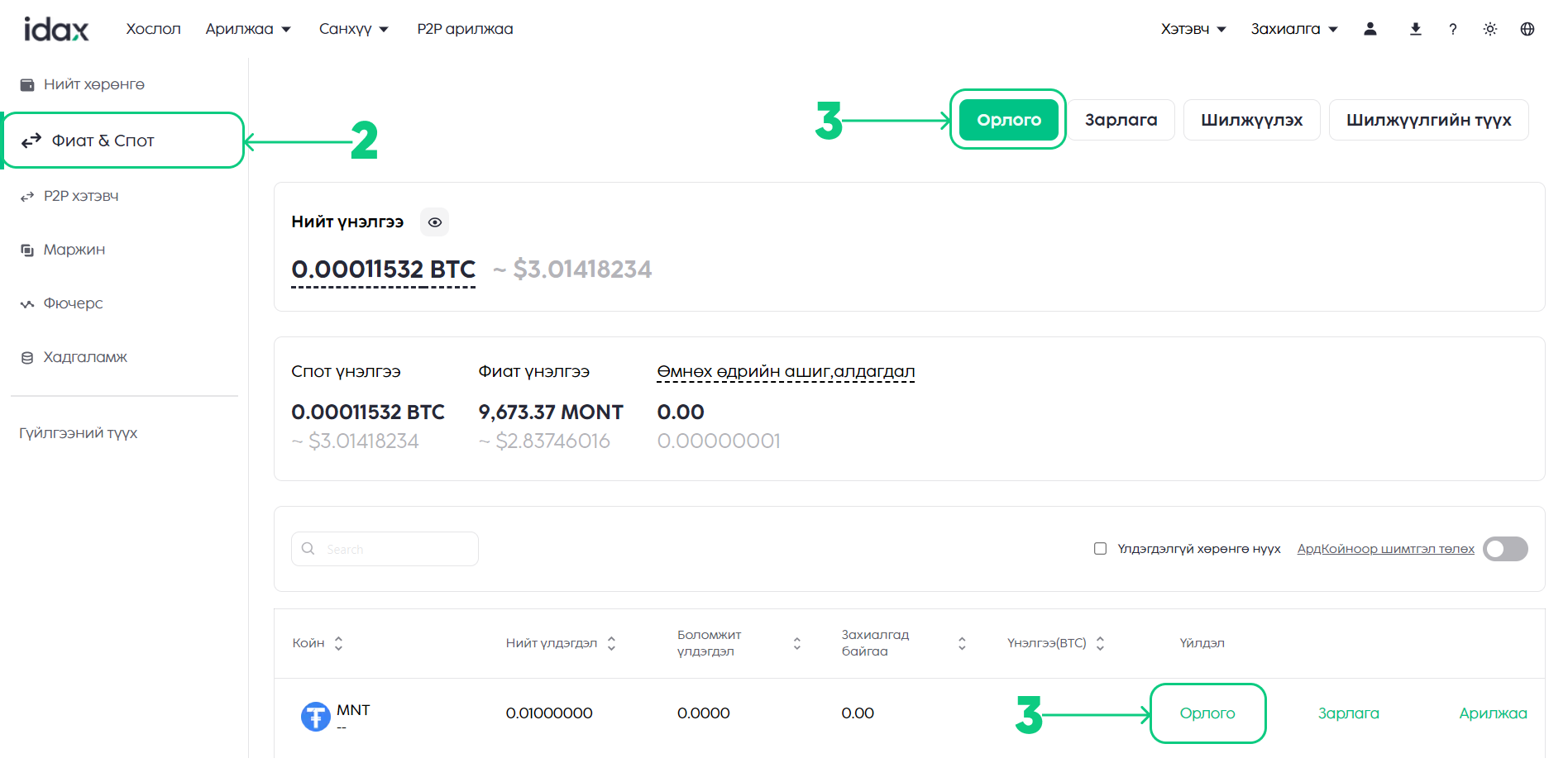
1. [**\[Хэтэвч\]**](https://www.idax.exchange/wallet/fiat) хэсэгт дарж орно
2. Дансны төрлийг [**"Спот & Фиат хэтэвч"**](https://www.idax.exchange/wallet/fiat) сонгоно.
3. Дансны төрлийг сонгож орсоны дараа **\[Орлого]** товчийг дарна эсвэл **"MNT"** хэтэвчний **\[Орлого]** хэсэгт дарж орно.

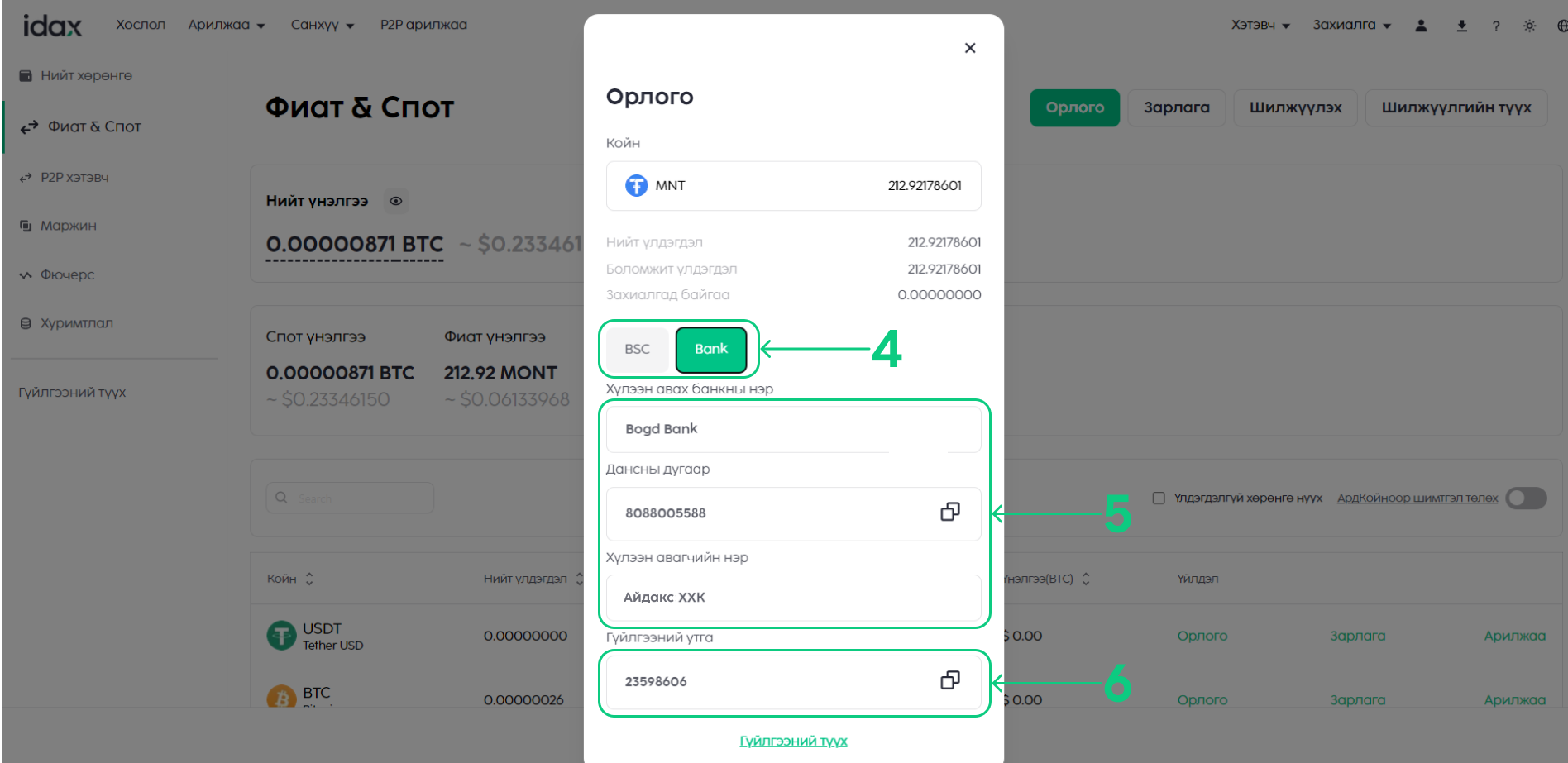
 4. Банкны дансаар орлого хийх тул **"Bank"** сонголтыг сонгоно.
5. Та өөрийн ашигладаг банк болон банк бусын данснаас Богд банкны данс руу гүйлгээ хийнэ.
6. Гүйлгээ хийхдээ **Гүйлгээний утга** дээр өөрийн **UID буюу хэрэглэгчийн дугаар**ыг оруулна.
4. Банкны дансаар орлого хийх тул **"Bank"** сонголтыг сонгоно.
5. Та өөрийн ашигладаг банк болон банк бусын данснаас Богд банкны данс руу гүйлгээ хийнэ.
6. Гүйлгээ хийхдээ **Гүйлгээний утга** дээр өөрийн **UID буюу хэрэглэгчийн дугаар**ыг оруулна.
 Зааврын дагуу гүйлгээ хийснээр таны idax хэтэвч автоматаар цэнэглэгдэх болно.
{% content-ref url="/pages/uHr8TMg43axvvTATrfJq" %}
[USER ID (UID) буюу хэрэглэгчийн дугаар хэрхэн харах вэ?](/home-mn/help-center/ayuulg-i-baidlyn-batalgaazhuulalt-2fa/user-id-uid-buyuu-khereglegchiin-dugaar-kherkhen-kharakh-ve.md)
{% endcontent-ref %}
Зааврын дагуу гүйлгээ хийснээр таны idax хэтэвч автоматаар цэнэглэгдэх болно.
{% content-ref url="/pages/uHr8TMg43axvvTATrfJq" %}
[USER ID (UID) буюу хэрэглэгчийн дугаар хэрхэн харах вэ?](/home-mn/help-center/ayuulg-i-baidlyn-batalgaazhuulalt-2fa/user-id-uid-buyuu-khereglegchiin-dugaar-kherkhen-kharakh-ve.md)
{% endcontent-ref %}